
Are you or someone your PAC is supporting on the primary or general election ballot? How to get the 21-day and 7-day reporting periods in ORCA
July 12, 2024
If you are not seeing the required reporting periods in ORCA, here is how you fix it!
1. Log in to your ORCA account
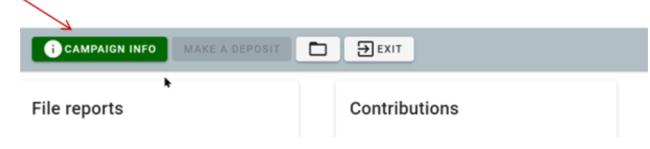
2. Click on the green “campaign info” button
Image
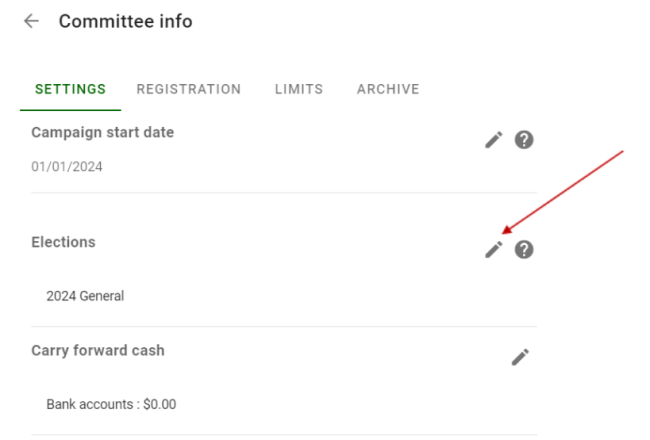
3. Under “settings” you will select the “edit” (pencil icon) next to “Elections”
Image
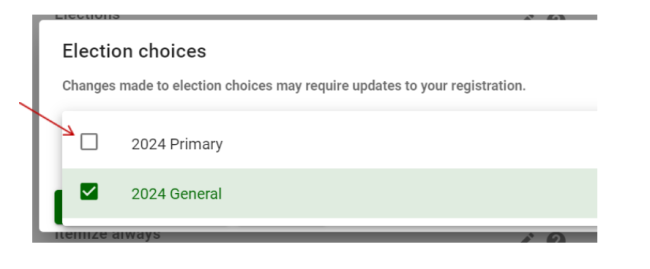
4. Add the “2024 Primary” and "2024 General" election when you see the election choices screen appear.
Image
Image
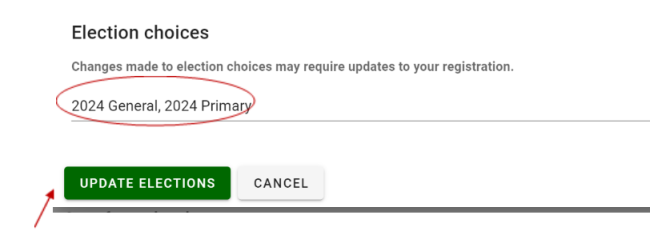
5. Once added, click “Update Elections.”
This will update your reporting dates and requirements to allow you to file properly your required 21-day, 7-day and post-election reports.
If you need assistance, please contact our office through a helpdesk ticket or by phone at 360-753-1111 option 1.